Sunday, July 10, 2011

Beach Cottage Bookbinding Studio

While we were waiting for Baby Blakely to arrive, I have been busy figuring out how to use all my new Bookbinding tools, and I think I finally have a good start on the process.  

The Beach Cottage studio is a mess, with Book Parts laying around everwhere:

These are some of the patterns I am going to make fabric out of...works for Books, too!


My first Book was okay, but not exactly even from front to back cover:

This Mango image is meant to be printed on Linen and framed under glass...time to get it done, now that I see it again.  It took me weeks and weeks to create this image - and I just forgot about it!

Living at the Beach, I'm partial to Coastal and underwater images...and my all-time favorites are images of Coral Branches and Sea Fans.  So I designed the following image over a year ago, and it was the first one I experimented with by having Spoonflower print it up for me:

Gluing up the Book Covers is agonizing.  Pure T.   But I am pleased with the finished look.

Once I finally got happy with the front and back Book Covers, I was off to the races, and started assembling:

Don't you think this would make beautiful fabric for a Lula Belle Handbag??  Or Wallpaper for a Beach Cottage accent wall??  Or how about Gift Wrap??  I started with the Coral image, then put it in repeat with other components to make the pages.  You can visit my post on making a Pattern Repeat to see how to do this.

The inside pages are lined and blank, meant for journaling or note jots:


And, here is the back cover:

All Done!


Next up, the Pomegranate Book - but that will be after I go see Baby Blakely again.


I think it's time to get the sewing machine cranked up and Sew "Stuff" to these Book Covers; and layer them up - what do you think?

Our Miraculous New Baby Girl

After nine long months, our newest beautiful Grandchild was born just before 6:00 AM yesterday.  Baby Girl Blakely has been happily snoozing away in her Mom's tummy for weeks on end, and we thought she would never come out to meet us.  

With only a little prodding from the doctor, she decided to wake up and join the rest of the world a little faster than anyone expected after that long wait - so there was some pandemonium in the hospital halls as everyone raced to catch her before she jumped out on her own.

She was alert and ready to go, since her Mom never got any drugs to help her with the labor and delivery, and looked everyone straight in the eye to put us on notice that she intends to make her mark in this family right quick.

So with a little help from me, here is her first Blog:


Hello everyone out there...my name is Blakely.  I am pretty new at this, but I know I'll catch on quick.  First of all, I want you to meet my beautiful Mommy:

Don't you think she looks like me?
She thinks I may wind up being a Volleyball star, but we'll see...Dad is all for anything I do, but he's already told me that he's going to teach me how to fish so that I'll be Lady Angler of the Year in about 18 years.

This is my Grandpa and my cousin Caroline...she is so smart, so beautiful - and she's going to teach me how to do all the stuff she knows how to do. I can tell that she likes me already...and my Grandpa has already told me I can have anything I want - anything!

I think I'll ask for a new Jaguar and a cell phone.

I got pretty hungry while all the adults were taking pictures and talking about me and my snappy little entrance, so my Mimi helped me out a little bit...

She's my Mommy's Mom, so she already knows how to do this stuff.

This is my first day, and I've been through a lot.  I'm getting sleepy now.


So, I think I will take a little nap...I've got the rest of my life to tell you more about me, so there's no hurry right this minute... 

G'night, all.


Friday, July 8, 2011

Orange Accents At the Beach!

I've been in an Orange Mood lately, and I just had to share these photos with you - they have really jazzed me up for the weekend stint in the Studio! 

Just look at this palette!  It is pure genius.
 Lauren Guarcello, of Porter Design Company, did this room for the Stately Homes by the Sea Showhouse.  Here's another look:

For some, the walls may seem too dark...but look -  the white bedding just lifts it right up.
 These gorgeous photos are courtesy of Peter Rymwid, and were posted by Kerri, a talented artist at Driftwood interiors in Brisbane, Australia.  She was tapped to create these paintings to co-ordinate with the room:

Now, doesn't this just make you want to go Crisp Up a room by throwing some Orange in it?
Look out, bedroom...you thought you had escaped!

Thursday, July 7, 2011

Mountains, Clouds, Blogs & Being Passionate

We are famous for "Blasting Off" for a road trip on the absolute spur of the moment.  So when we got up on July 4th, stuck our arms outside to test the temperature (Hot) and humidity (Muggy) and considered that we had no coherent plan (again) for the July 4th Holiday, it was a lock that a Road Trip was imminent.  As in, immediately.

We went to the Blue Ridge Parkway last year and were delighted to find that even in August, the temperatures were lovely.  Not to mention that the view from the Pisgah Inn, on top of Mt. Pisgah, can be awe-inspiring when the clouds move in.   A quick call confirmed that they had two rooms left, and that there was a cold front coming.  After arranging for the room on the top floor (of course!) we roared out of town.


Upon arrival, we stepped out of the car to mist, clouds, and 64 degrees Fahrenheit, a solid 30 degrees cooler than the Coast!!  First thing I did was flee to the gift shop to purchase a sweatshirt.  With the forest still dripping after the storm, we slid through the foliage just to get wet and be chilly.  So refreshing, so lush! After a lovely dinner overlooking the valley below, we watched fireworks that were far, far below, then drifted to sleep under two blankets...


Next morning, this was the view from our balcony.  (I decided to do my photographs in Black and White for once)


Although the sun was brilliant, the clouds were gathering across the way.

Looking the other way, there was a stately old tree skeleton decorating the Horizon...

Two Winters ago, the temperatures were so frigid on the mountain that many trees simply died of the cold.  We were told that when the workers arrived to open the hotel for the Spring Season, it took over a week to clear all the fallen trees off the Parkway so that they could get to the hotel.  The forest is dotted now with these ghostly skeletons, which have a beauty of their own.


 After a vigorous morning of hiking for my husband, reading for me, and lunch, the storm clouds began to move in swiftly:


This is what I love about being on top of the mountain - you are literally residing in the clouds.
Since our balcony looked South, I was protected from the wind and rain, and could watch the storm in cozy safety.


You can see the swirl of the updrafts...


 The storm took its time, which was fine with me since I had a ringside seat to watch something that few people ever get to see - I could have watched all afternoon.


And then,  the storm gathered her skirts and marched off to the South:

You can see the steam already beginning to rise from the Valley in certain spots...


 I wanted to walk through the remnants of the clouds and feel the cool air, so I set off with my camera - and found so many happy plants, and  so many happy critters drinking down the raindrops!

After seeing all of this, walking in the clouds, and sleeping in the mists, I can hardly wait to get back in the studio and create something!

I spent my time on the mountain top resting, reading, and remembering how to See what I am looking at - a skill I quickly forget when Life intervenes.  But, this time, I was helped out not only by our trip to the Mountains, I was also inspired by a new Blog I found quite by accident while searching the internet for postings by Japanese writers.  I found Keiko, a story- teller from Nara, Japan.  And One Time One Meeting is her blog. 

Her inner eye is wide open and engaged, and her readers are treated to lovely photography which she uses to support her history and cultural lessons - which she is Passionate about.  My shoulders always come down from their perch up around my ears when I read her posts.  And I stop being guilty about being Passionate.  Because if one isn't, then why bother?

Now, I'm off to create something!     

Monday, July 4, 2011

How to Design a Half-Brick Repeat with Photoshop

Here is a quick tutorial to follow up on my post on how to create a Pattern Repeat.  You can use Photoshop (of course!) to do all the work for you after you've created your image.  Here's how.

Design an image - don't let the design go all the way to the edge of your canvas.  Make your image square.  Your image can be a print or painting that you scan into your computer, or something that you create using your computer.  Open it in Photoshop.  Then, to practice and get comfortable with this process, RESIZE your image to something that is fairly quick to handle - say, 500 pixels by 500 pixels at 72 DPI/PPI.  You can get serious later with higher resolution.


I've made this with a lot of Contrasting Colours so that you can see it better, even though the design doesn't make a lot of visual sense.   This image is 500 x 500 pixels.


Now, open a new blank canvas that is 500 x 500 pixels.  Then go to your image canvas, click on the Select Menu, and click "All".  

This selects your entire canvas quickly and accurately.


Go to Edit Menu, and click on Copy.  Move to your blank canvas, and click Edit, then Paste.


Now you have two identical screens, one with your original image, and one with the new canvas and your image layered on top.  

To begin your Half-Brick Repeat, you must double the width of your "New" canvas.  You do this by going from the Image Menu - select Resize, then Canvas Size.  You'll see a screen that shows you the current size of your image (500 x 500 pixels), and a section labeled "New Size".  In that section, make the WIDTH of the canvas exactly double, or 1000 pixels.  Keep the height the same as your original image.  Before you click OK, select the anchor on either the right or the left so that you get a full 500 pixels added to one side of your existing canvas, not 250 on each side.

See the Anchor arrows - this will make sure that the additional width is added to one side.
Now your canvas looks like this:


Duplicate this layer.  You can name it or not - I usually don't because I'm moving too fast!


To "drop" the image by 1/2, go to the Filter menu, choose Other, then "Offset". 


On the Offset Screen, enter the original width of your canvas in the Horizontal block, and half that value in the Vertical block.  This will drop your image by half.

 Now your image looks like this:

Flatten the layer after Offsetting it.
 Now you can fill in the blank areas with anything you want - just don't touch the edges!  Go back and look at How to Design A Pattern Repeat to see how Julia Rothman filled in her design. 

I filled mine in with Doodles and such, just to show you how to fill it out...


After you've filled in your design, be sure to flatten it if necessary, then Select All again, and move to the edit menu and select "Define Pattern From Selection".  Name the pattern the same name as your new file.

Open a new canvas at least twice as large as this pattern - 2000 x 2000 pixels.  This will allow you to see your repeat better.  Select -> All, then Edit-> Fill Selection, using your newly named pattern.  And this is what it looks like!


Now you can adjust your "additions" to make sure they are pleasing to the eye when filling a large expanse, and don't create an obvious line (like mine did up the middle).  Once you do this a couple of times, it will be so easy.  Now, get to designing!

Saturday, July 2, 2011

Coastal Time-Out for a Ferry Ride

Although I am thoroughly excited about getting back to work, I am still subject to those lovely little Time-Outs that happen when one is at the Coast.  

My husband had an appointment in Wilmington on Friday morning, and when he offered up a post-meeting tour of the Carolina Beach Fishing Pier and subsequent Ferry Ride, connecting back to Southport... well... how could I resist an offer like that?

To access the pier, you start by climbing up wooden steps and going through their little grill/restaurant:


Carolina Beach Fishing Pier entry.  There is a great Blog about Carolina Beach Here.

Although the Pier looks dilapidated, it still produces fish...the fishermen told us they were beginning to catch King Mackerel again, after a two-week "dry spell".  


This Fishing Pier is where my husband spent every Summer as a little boy - he and his Mom, Vera, would spend all day every day fishing here.  He says his Mom was the first person to ever catch a King off this pier!  She DID catch a King Mackerel (a big one) off this pier, but I'm not sure about the rest...


There was a resident Pelican who greeted everyone and made sure they gave him any left- over bait before they left:


After searching through block after block of houses back on shore, Husband finally found the little house his family had owned there, and although I'm sure the paint colour and small elements were different, he recognized it - there was still a little old Guest House behind it, just like he remembered.  After this nostalgic pause, we headed down to Fort Fisher to board the Ferry.

Ft. Fisher is a Historic Site - the Fort protected the Port of Wilmington during the Civil War, so that "Blockade Runners" could slip through the blockade of enemy boats, come up the Cape Fear River,  and deliver everything from food to ammunition to the port city.  From Wilmington, these supplies and the occasional luxury item were shipped by Railroad Trains all over the South.  Ft. Fisher was captured by the Union forces in 1865, so badly needed supplies could no long reach the Confederate Army.  This hastened the Fall of the South, and the Civil War ended soon after.


So here we were, being entertained by Sunflowers dancing in the breeze 146 years later at what was once a Battle Site, while we waited at the landing for the Ferry.


A beautiful old Cedar Tree framed out the view of the Cape Fear River.  Now, ships from all over the world travel up this river, still passing by the Ft. Fisher Ferry Landing on their way to the Port of Wilmington; still bringing supplies to the South.


Here comes the Ferry!
Turning in to the Landing.
We were finally waved aboard, and after parking the car, went up top to enjoy the view while cruising across the Cape Fear River and down to Southport...


Leaving Ft. Fisher.
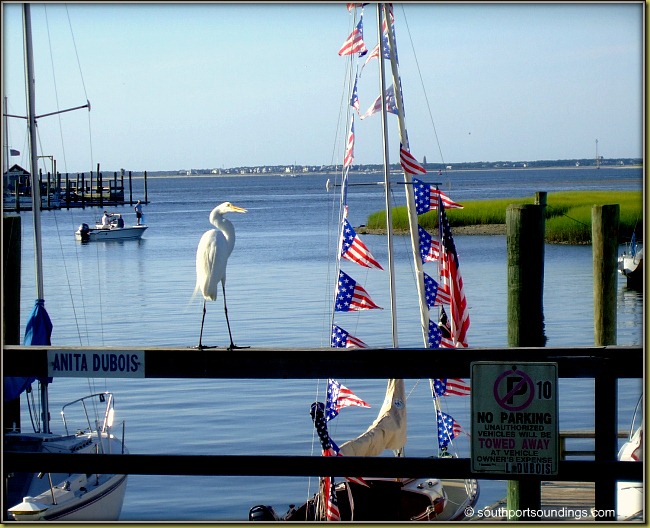
We were greeted in Southport by enthusiastic home and shop owners, decorating for their renowned 4th of July Celebration!


This photo was taken by Southport Soundings, a blog about Southport, NC.
From there, we traveled back to Ocean Isle - much the better for our little "Coastal Time Out".  Now, it's back to work!

Tuesday, June 28, 2011

How to Design a Pattern Repeat

When I first started designing images that I uploaded to Spoonflower for digital printing, I was centering the images for use on an 18" x 18" pillow.  The images had "White Space" all around them, because they were centered on the pillow, like a framed painting.  That left plenty of room for the seams, trims, and the zipper at the bottom of the pillow.  Then I started fiddling around with putting my images into repeats, with the idea that they could be used for wallpaper or gift wrap.

Spoonflower's in-house software can put your images into various repeats, like this Half Brick repeat shown on a Paul Stuart tie:


This is their Blue Printed Surfer tie.  See how the surfer shifts over on every other row?   That is a simple Half Brick repeat, and is pretty for small objects...or in small doses.  You wouldn't want several yards of 54" wide fabric printed like this, or the image would turn into a ditsy sea of dots.

To get an image to Flow across a large expanse, with no obvious start or finish, you have to use a few tricks.  


There is no defined center when you look at this Waverly fabric called Hidden Reef- it just flows seamlessly from side to side, and also from top to bottom.   Although it looks very complicated to create, it is actually quite simple.

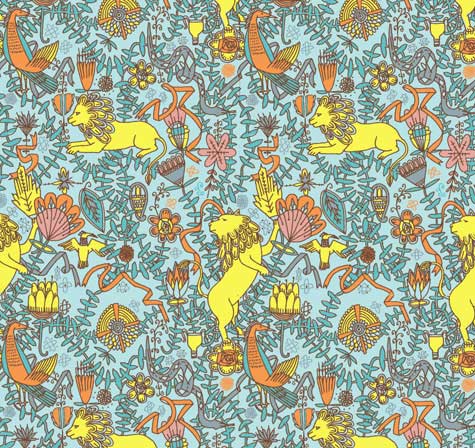
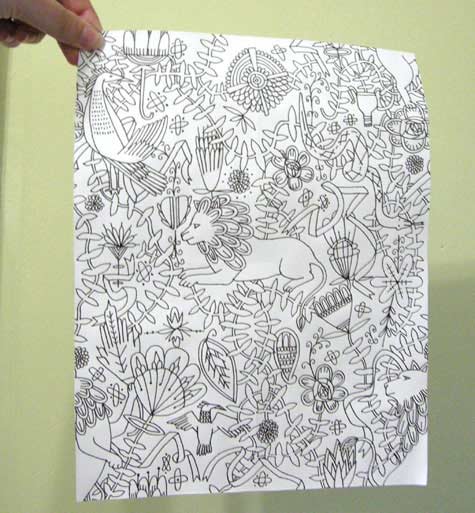
After months of experimentation with Photoshop and their Offset Filter, I came across this straightforward tutorial in how to create a seamless repeat that flows effortlessly.  Julia Rothman shows us how she created this pattern:


Here is the text of Julia's tutorial:


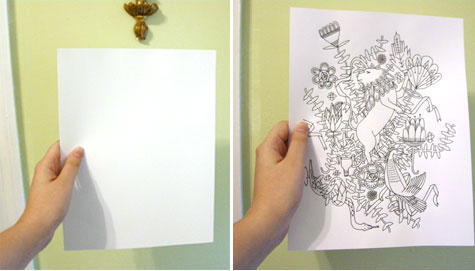
"One of the questions I frequently get emailed is -how do you make a repeat pattern? I thought it would be fun today to do a little tutorial showing you how simple it is even with a very complex drawing. And you don’t even need a computer! (I usually do my repeats on the computer but today I’m doing it the way I was first taught.) Here’s the old fashioned way of making a tile-able design:


On a clean piece of paper draw a design in the middle of your paper without letting any of the drawing touch the edges- this is very important. (I am going to draw lions and vine-y things- an influence from last months visit to the American Folk Art museum in nyc.)


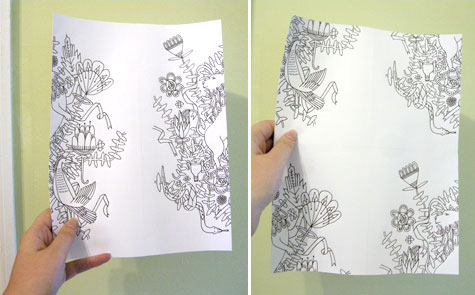
Once you finish the middle space as much as you want you are going to cut your drawing in half- scary I know- but that’s why computers are helpful. Once you have the two pieces flip them and tape your drawing back together. Put the tape on the back of the paper so it doesn’t obstruct your drawing at all later. Also try to tape your drawing back together as perfectly lined up as possible. It’s hard to see that I’ve even taped mine since I’ve lined it up so well. Next you are going to cut your drawing in half again the other way- (yikes!) and flip those pieces and tape them back together. Now your design should be on all the edges only and you have a big middle white space. Now fill this space with the rest of your design. Remember again- do not draw to any of the edges of the paper.

Once you finish filling in all the parts you want to fill in you now have your repeatable tile. You could color this tile and then xerox it many times and line up your design- plaster it on your walls and make wallpaper. I am going to cheat and do the final coloring steps in the computer to finish up my design. I am going to scan my drawing, take it into Adobe Illustrator, color and repeat it there."


I used Julia's tutorial to go to Photoshop and use the Offset Filter to whack my design into quarters, like she did, and then just filled in the center with the whole (original) design.  You could always put something different in there...the sky is the limit!

Now to figure out a half-drop, tileable repeat...any suggestions out there??

Monday, June 27, 2011

Beach Cottage Renovation Finished!

After my two month hiatus to tend to the Beach Cottage renovation, I have GOT to get back to Textile and Graphic Design.  So that I don't feel like I left everyone in the middle of the road, here are some shots of our finished renovation - that I am just so in love with.  Pictures aren't hung yet, because I can't bear to put holes in the walls yet!  Maybe tomorrow.

The "sewing/create something" room is now totally white.  I took the old kitchen peninsula and made a cutting/pattern table out of it.  And, look at my new window by the sewing machine!
This is what it looked like before:


Big Change, there!

Kitchen all finished!
My yummy new tub, that USED to be my closet!
The mirrors tilt!
Wooden blinds coming tomorrow - do you remember how this looked a month ago?  Yikes!
This was the bathroom on May 24.  What a difference, huh?

     So much work, soooo much work.  But I am happy, happy, happy.  And now it is time to get back to Surface Design...graphics, textiles, Illustrator and Photoshop.  In my clean new house!


LinkWithin

Related Posts Plugin for WordPress, Blogger...